A knowledge base for all your AI chats.
You ask ChatGPT or Claude about work and life every day. Then the best answers sink into chat history. Capacities keeps them as notes that link up and grow, and your AI can read from them and add to them.
Works with ChatGPT, Claude, Le Chat, Grok, and many more
The problem
Insightful conversations. Scattered and not turned into knowledge or action.
On Monday you drafted the launch email. On Tuesday you asked for feedback on the timeline. On Wednesday you researched competitors. Three good chats, each in its own thread. Now it’s Thursday, and you need all of it. Which chat was it in?
Today: a pile of chats
- Birthday gift ideas for DadToday
- Launch email, third draftYesterday
- Sourdough not rising??Mon
- New chatMon
- Explain index funds simplyLast week
- Rewrite my bio, friendlierToday
- Feedback on the launch timelineTue
- Summarise interview #7Last week
- UntitledLast week
 Grok
Grok- How competitors launched in 2026Wed
- Best time to visit LisbonLast month
- Is oat milk healthyLast month
With Capacities: one page that connects
Launch plan
Everything about the launch, wherever it came from.
- Launch emailDraft
- Timeline feedbackNote
- Competitor launchesResearch
- MayaPerson
- Kickoff, 2 SepMeeting
Chat history is a long list sorted by date. It doesn’t know that those three chats belong together. In Capacities, they land on one page, right next to the people and meetings they’re about.
Your AI gets a memory you own
Nothing about the way you chat has to change. But you’re in control and you keep the insights.
Connect your AI
Add Capacities in ChatGPT or Claude and sign in. It takes about a minute and needs no setup.
Keep chatting
Ask and brainstorm the way you always do. When something is worth keeping, just say so.
Watch it grow
Each saved piece links to what it’s about. Your next chat can start from all of it.
In the chat
Find, save, and connect without leaving the chat.
Your assistant can look things up in your knowledge base, add new notes, and link them to what they belong to. It can also read across many notes and tell you what it sees. Pick an example.
Which restaurants did Jonas recommend for Lisbon?
Jonas suggested Taberna da Rua das Flores and Cervejaria Ramiro. You saved both on your Lisbon trip page in March.
Read from in Capacities
TripLisbon, May
- Taberna da Rua das Flores, from Jonas
- Cervejaria Ramiro, from Jonas
- Hotel booked, 12 to 16 May
Your AI
Your AI can change. Your knowledge stays.
Memory built into a chat app stays inside that app. Your Capacities knowledge base belongs to you. Stick with one assistant, add a second one later, or move to a new one. Your notes are always there.
Launch plan
One page in your knowledge base
When is the launch again?
3 October. It moved from September after your call with Maya.
Launch planWrite a short update for the team about the launch.
Here’s a draft based on your Launch plan page…
Launch planWhat is still open before we launch?
Two things: the venue booking and Maya’s sign-off on the email.
Launch planKnowledge work doesn’t stop in a chat
A chat is great for asking. It’s a hard place to look around. Capacities gives your knowledge a home you can open, browse, and shape, with a page for every person, book, and project, and a daily note for whatever comes up.
See how things connect
Open any page and see everything that links to it. The graph shows the neighbourhood around an idea, so you notice what belongs together.
Everything has its place
A book has an author and a rating. A meeting has people and a date. Your AI can fill these in, and you can change them whenever you like.
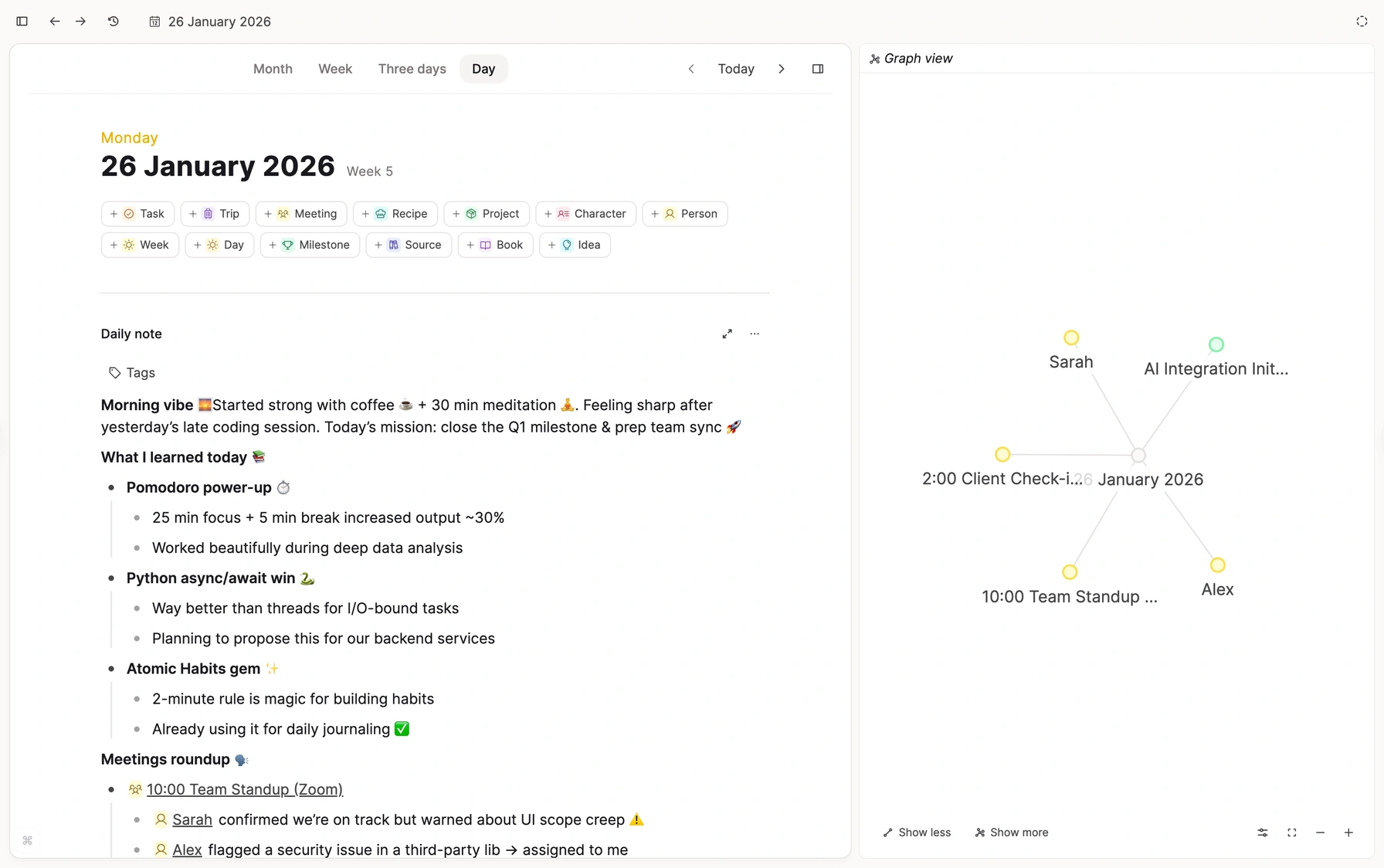
And when you’re in Capacities, the chat comes along
Open the AI chat beside any page and ask about what you’re reading. It works from your own notes, right where you keep them.
Ask about the page in front of you
The chat already knows what you’re reading. No copying text into another window.
Keep the good answers
Save a reply as a new note in one click. It joins the rest of your knowledge base.

Over time
A knowledge base that grows with you.
Every conversation can leave something behind. After a while your AI doesn’t start from zero anymore. It starts from what you’ve already learned and decided.
Week 1
A few answers worth keeping.
Month 3
People and projects start to link up.
Year 1
A map of what you know. Every chat starts from it.
Questions people ask
Give your AI a memory you own
Start your knowledge base for free. Connect your AI chat with Pro.