Person
Lena Brandt
Tags
Leads marketing for the Spring Launch. Likes a short written summary before every call.
Linked from
- Weekly sync with Lena
- Thursday, Oct 15
Most second brains die of upkeep. Capacities comes with the structure built in: a note for today, a place for every person, book, and project, and links that bring it all back. You just write.
Used by 50,000+ active knowledge workers
Monday
19 October 2026
Daily note
The idea
A second brain is a trusted place outside your head for what you learn, think, and plan, so you can find it and build on it later.
Tiago Forte made the term popular with his course and his 2022 book Building a Second Brain. The idea is much older: commonplace books, index cards, and the Zettelkasten all did the same work on paper. We wrote more about it in A second brain.
“Your mind is for having ideas, not holding them.”
Every second brain has three jobs.
Get a thought out of your head the moment you have it, before you know where it belongs.
Give it a place that still makes sense in a year, so it doesn’t turn into a pile.
See it again when it matters, next to the people and projects it belongs to.
Most apps give you the parts and leave the building to you. Capacities does all three out of the box.
Why they fail
People don’t give up on their second brain because the idea is wrong. They give up because keeping it alive turns into a second job.
Databases, templates, plugins, dashboards. You spend a weekend building it, and another one fixing it when your work changes.
“I spent more time tinkering with the system than actually using it.”
Which folder? Which tag? Which database? When saving a thought means choosing where it goes, you stop saving thoughts.
“On Notion you still have to decide WHERE to put things.”
Everything goes in. Nothing comes back out. Search only helps when you remember that a note exists.
“I can search, but I can’t search for what I forgot exists.”
A second brain only works if it’s less work than your first one.
How it works
Capacities is built on three ideas. Together they catch, keep, and bring back what you write, so you never design a system before you can use one.
1 · Today is the inbox
Monday
19 October 2026
Coffee with Maya . She recommends Material World for the talk.
One line, two links. Nothing to file.
2 · Think in things
Material World
Lands with your books. Every book gets the same properties.
3 · The network remembers
Maya
Mentioned in
Open Maya before the rehearsal, and it’s all there.
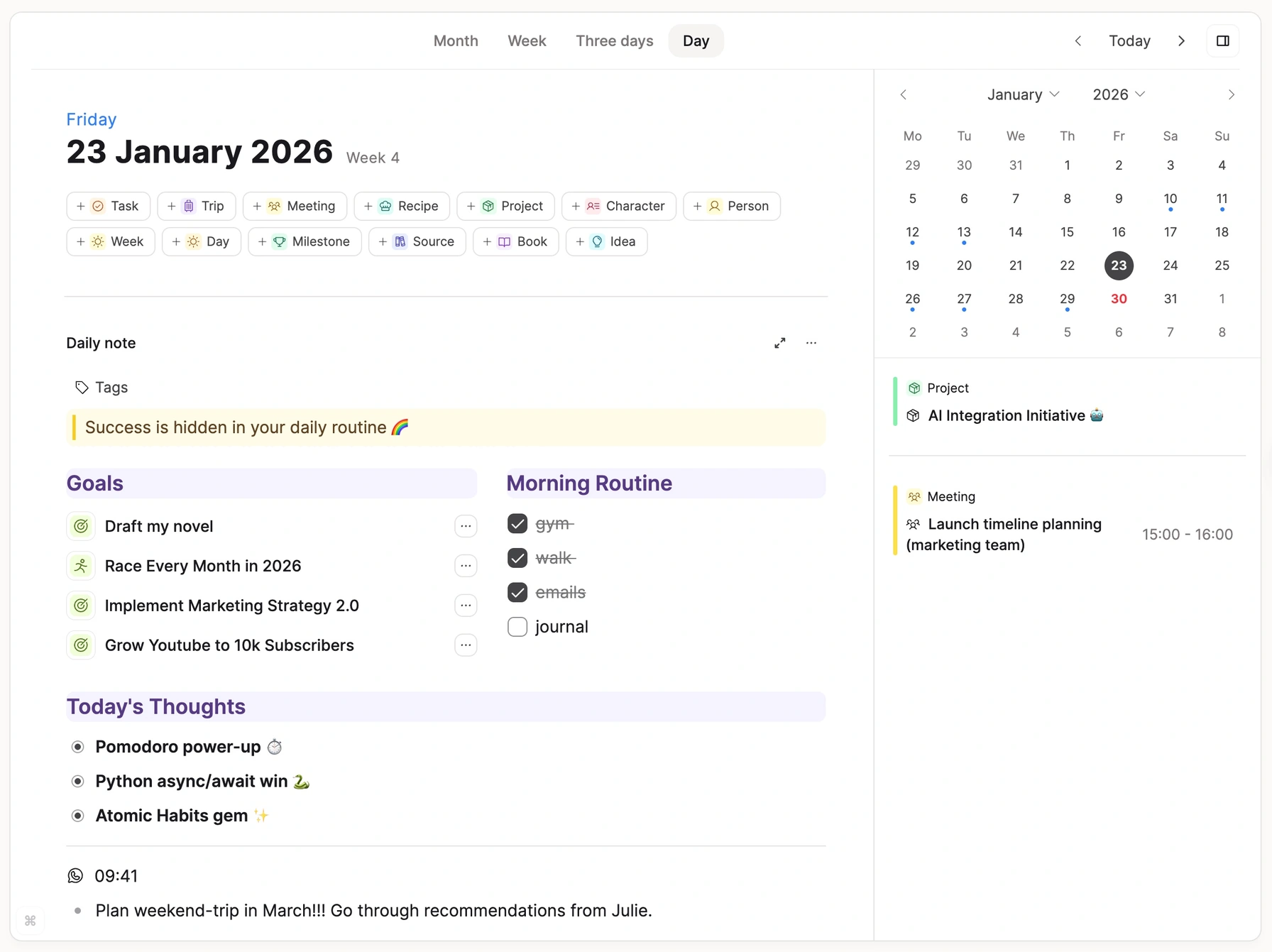
Every day has its own note. Write whatever comes up, and link a person or a project if you want to. Nothing has to be filed before you can move on.
Your notes and everything you created today, in one view. With Pro, your meetings sit on the same page.
Send a thought from WhatsApp, Telegram, or email, and it lands in today’s note.
When a passing thought grows, turn it into a project, a person, or an idea of its own.
“I love that I can just brain dump my thoughts and deal with it later.”
In Capacities, everything you keep is an object with a type. A book has an author. A meeting has a date and people. Upload a PDF and it lands with your PDFs. The type gives each note its place, so “where does this go?” stops being a question.
Add a property to a type, and every object of that type gets it.
A note can belong to a project, a person, and a topic at the same time.
Begin with pages and the daily note. Add types like Book or Meeting when you notice you need them.
Lena Brandt
Leads marketing for the Spring Launch. Likes a short written summary before every call.
Linked from
“When I upload a PDF, it goes into a dedicated place for PDFs.”
Every link in Capacities works in both directions. Mention a contact in a meeting note and in today’s note, and when you open that contact, both are already there. Your notes come back in context, not only when you search.
Every mention shows up on the object it mentions.
Related Content shows the closest notes under the one you’re reading, even ones you never linked.
Search, tags, queries, and the graph. Use the ones you like, ignore the rest.
Thursday
15 October 2026
Already in your space, linked to what you just mentioned
A daily note types itself. Each name it links, such as Maya Chen, Spring Launch, the book Deep Work, and Lena Brandt, appears in the graph below it. Objects that were already linked to Spring Launch, such as the pricing call and the Q3 roadmap, show up too.
“If I go to that contact, all the information of the other notes are there.”
Write it down, link it to what it belongs to, and let it go. The call you have to return, the idea for the talk, the line from the book. It’s all in a place you trust, so your head has room again for the thing in front of you.
Over time
A second brain is only worth it if you still use it in a few years. People start with the daily note in their first week. Later, they tell us they stop thinking about the system at all.
Week one
“I started using it functionally from the first week! I continued to make tweaks but I didn’t feel like I needed to build the whole thing up before being able to use it.”
Reddit, r/capacitiesapp
First month
“At first, Capacities’ “objects” felt strange. But following some advice, I tried adapting to this new way of thinking for a few weeks, and it just clicked.”
Reddit, r/capacitiesapp
Year two and beyond
“I’ve been using Capacities for about two years now, and I don’t think about the system at all anymore. It evolves, of course, but naturally and without any friction.”
Reddit, r/capacitiesapp
Connect your AI assistant to your space. It looks things up in your notes before it answers, and saves what it learns back as notes you can open, edit, and link.
ChatGPT, Claude, Le Chat, Cursor, Claude Code, and many more connect to the same space.
Memory built into a chat app stays in that app. Your notes stay yours when you switch assistants.
Each connection reaches only the space you pick. Every edit is saved in version history.
Launch plan
One page in your knowledge base
When is the launch again?
3 October. It moved from September after your call with Maya.
Launch planWrite a short update for the team about the launch.
Here’s a draft based on your Launch plan page…
Launch planWhat is still open before we launch?
Two things: the venue booking and Maya’s sign-off on the email.
Launch planNothing to maintain
No plugins to update, no sync to set up, no code inside your notes. Capacities is built and hosted in Europe by a small, independent team, funded by the people who use it.
Phone, tablet, desktop, and web. Works offline, too. Included on the free plan.
Automated Markdown exports to your own device, several times a day.
Your notes come out as notes. No query syntax or plugin code inside them.
Export everything, any time. If you leave, your knowledge comes with you.
Choosing an app
Capacities is not the right second brain for everyone. Here is where we would point you somewhere else.
Pick Obsidian or Logseq. Capacities is a cloud app with offline access and Markdown export, not a folder of local files.
Pick Notion. Capacities is built for one person. There is no real-time collaboration, and none is planned.
Pick Anytype. Capacities stores your notes on EU servers, encrypted in transit and at rest, but not end to end.
Start your second brain on the free plan. The structure is already there.